[PAID] OneSignalPush: Implement push notifications using Latest SDK - v5.9.2 ($10 or INR 701)
The OneSignalPush extension allows you to easily receive push notifications sent from the OneSignal dashboard or from blocks in your app. You can send notifications to all subscribers and individuals, and send customized notifications.
1. Overview
- Integrate latest OneSignal SDK v5.9.2 for push notifications
- Send notifications to all subscribers or specific users
- Customize notifications with large icons, big pictures, and data payloads
- Manage user subscriptions, tags, emails, and phone numbers
- Handle notification interactions with events like opened, received, action button clicks
- Set small icon, language, and handle permissions on Android 13+
Latest Version: 4
Published: April 30, 2024
Last Updated: May 26, 2026
Aix size: 3.7mb
Permissions: android.permission.ACCESS_NETWORK_STATE , android.permission.POST_NOTIFICATIONS
2. Blocks
3. Documentation
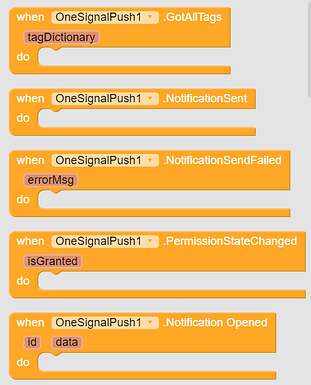
GotAllTags | Raised after GetAllTags finishes. Returns all user tags as a dictionary. |
NotificationSent | Raised when a notification is sent successfully |
NotificationSendFailed | Raised when sending a notification fails. Returns the error message. |
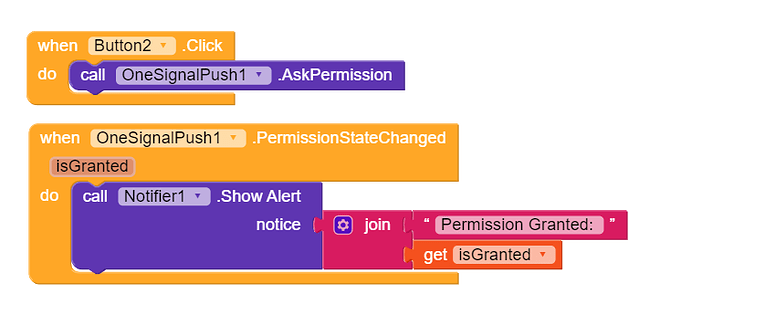
PermissionStateChanged | Raised after requesting notification permission. Returns true if permission was granted. |
NotificationOpened | Raised when the user opens a notification. Returns the notification ID, title, body, and the notification data as JSON text. |
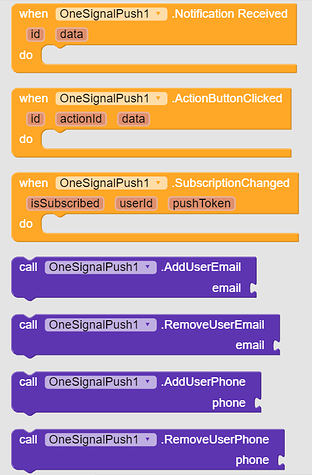
NotificationReceived | Raised when a notification is received while the app is open. Returns the notification ID, title, body, and the notification data as JSON text. |
ActionButtonClicked | Raised when the user taps a notification action button. Returns the notification ID, action ID, title, body, and the notification data as JSON text. |
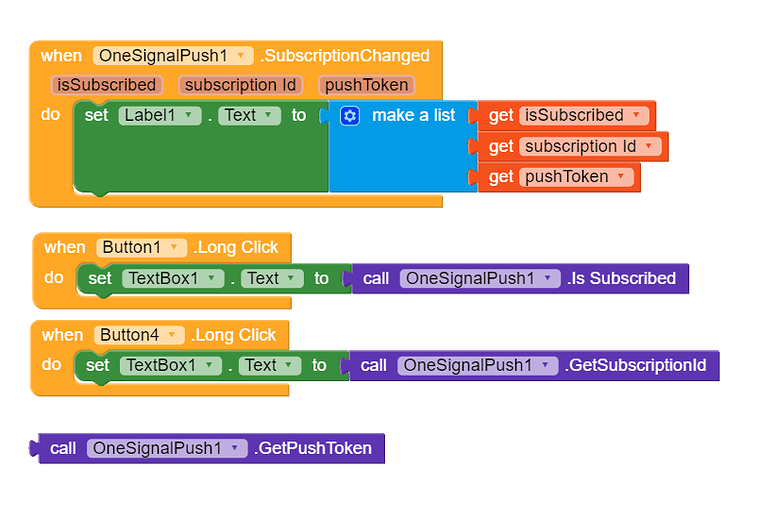
SubscriptionChanged | Raised when the push subscription state changes. Returns whether push is enabled, the subscription ID, and the push token. |
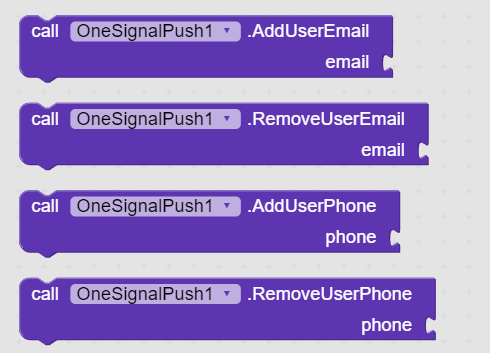
AddUserEmail | Adds an email address to the current user in OneSignal |
RemoveUserEmail | Removes an email address from the current user in OneSignal |
AddUserPhone | Adds a phone number for SMS messages |
RemoveUserPhone | Removes the phone number used for SMS messages |
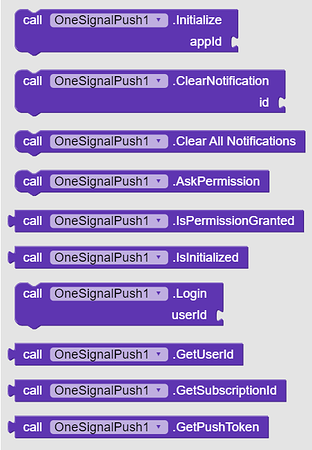
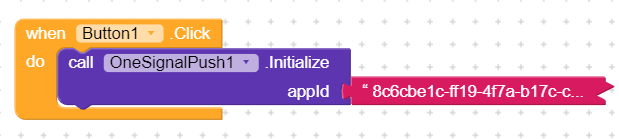
Initialize | Initializes OneSignal with your App ID. It is recommended to call this only once. |
ClearNotification | Clears a specific notification using its Android notification ID |
ClearAllNotifications | Clears all notifications posted by this app |
AskPermission | Requests notification permission on Android 13 and above. Use the PermissionStateChanged event to know the result. |
IsPermissionGranted | Returns true if notification permission is granted. Always returns true on Android 12 and below. |
IsInitialized | Returns true if OneSignal is already initialized |
Login | Logs in with the given external user ID so you can identify the user across devices and send targeted notifications |
GetUserId | Returns the current external user ID set with Login |
GetSubscriptionId | Returns the current push subscription ID. It is used when sending notifications to specific users. |
GetPushToken | Returns the current device push token |
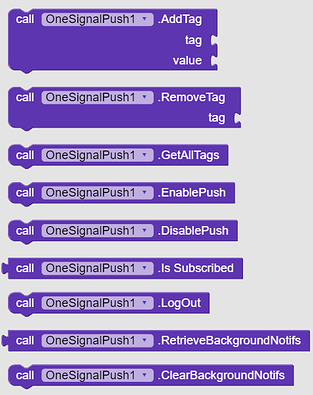
AddTag | Adds or updates a user tag with the specified key and value |
RemoveTag | Removes a user tag |
GetAllTags | Gets all tags for the current user. The result is returned in GotAllTags event. |
EnablePush | Enables push notifications for the current user in OneSignal |
DisablePush | Disables push notifications for the current user in OneSignal |
IsSubscribed | Returns true if push notifications are enabled for the current user |
LogOut | Logs out the current user from OneSignal |
RetrieveBackgroundNotifs | Returns notifications that were received while the app was closed. Each value contains the notification data, title, and body as JSON text. |
ClearBackgroundNotifs | Clears all saved background notifications |
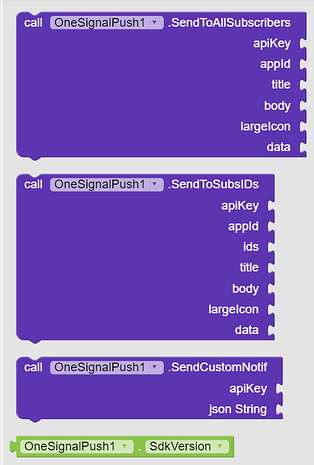
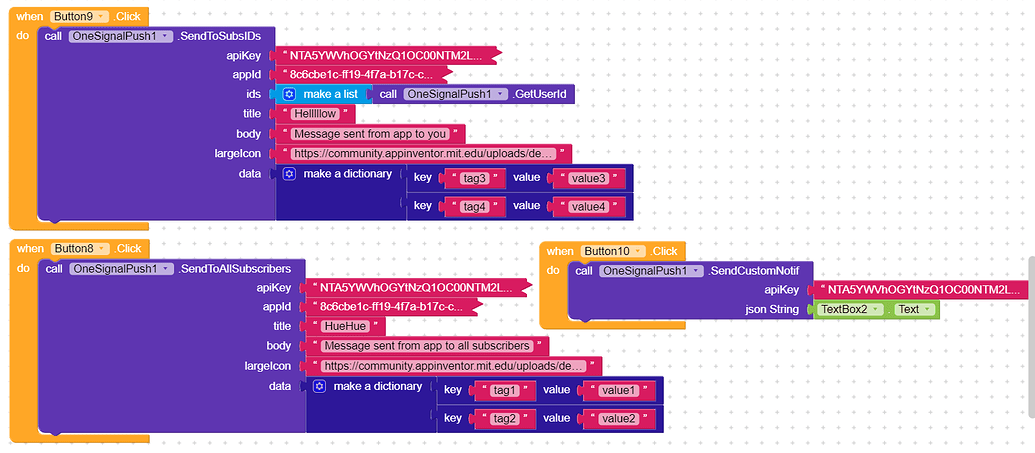
SendToAllSubscribers | Sends a notification to all subscribed users |
SendToSubsIDs | Sends a notification to the specified subscription IDs. Use GetSubscriptionId to collect these IDs first. The IDs should be provided as a list of strings. |
SendCustomNotif | Sends a custom OneSignal notification request using raw JSON. Use this when you need options not covered by the built-in send blocks. Notification sound can be set in the JSON using the "sound" key. Example: "sound": "notification" for notification.mp3 in assets or "sound": "default". The JSON should include the app_id and at least one targeting parameter (e.g. included_segments or include_subscription_ids). Refer to OneSignal's API documentation for details: https://documentation.onesignal.com/reference/create-notification |
SdkVersion | Returns the OneSignal SDK version used by this extension |
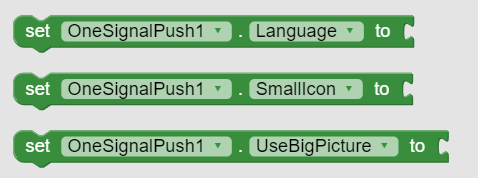
Language | Sets the user's language in OneSignal. Example: "en" or "hi" |
SmallIcon | Sets the custom small notification icon from app assets, to be used while showing notifications |
UseBigPicture | If true, notifications sent by this extension will use the image URL as a big picture instead of a large icon |
4. Example Usage
Initialize OneSignal sdk
Ask for Notification Permission (will be asked only on Android 13 and above versions
Then Enable Push Notifications i.e. Subscribe User
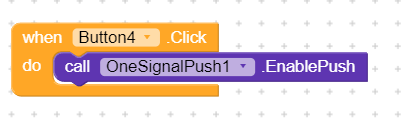
Subscription State will be changed after EnablePush method
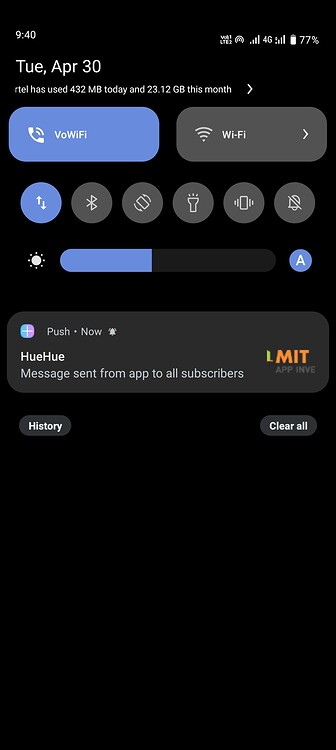
Now you can send Push Notifications
Set custom Small Icon

Custom icon can be set only from assets
You can generate small here from here
Requires Android Marshamallow (Api 23)
5. Demo video and images
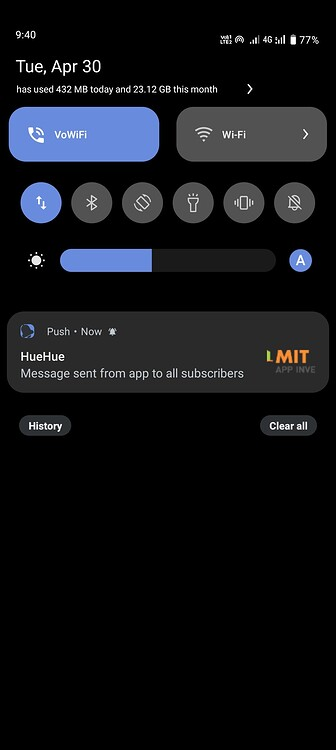
6. Purchase Extension
7. Change Logs
Version 2 ▼
Updated OneSignal SDK to
5.1.17New Blocks


Blocks Renamed
SetExternalId→LoginRemoveExternalId→LogOutGetUserId→GetSubscriptionIdWorks with all Firebase Components
Aix size increased to
2.9 mb
Users will have to put license key in Designer Property instead of uploading in Assets.
Version 3 ▼
SDK updated to 5.1.23
Version 3.1 ▼
Fixed crash in companion
Version 4 ▼
OneSignal SDK updated to v5.9.2 (latest)
Added In-App-Messages feature
Custom notification sound feature
Add_osp_soundkey to additional data with value as mp3 asset file name only (no file extension)Removed all class conflicts
The extension is now self-contained and works well with all other components and extensions
Aix size has increased to 3.7mb
Thank you.
Hope it helps!