[PAID] FlipBook: Create Interactive eBooks and Magazines from PDF Files ($5 or INR 301)
1. OverView
The FlipBook extension enables you to create interactive eBooks and magazines using PDF files. It supports initializing flip books from both local and online PDF files, ensuring flexibility in content sourcing. Users can easily navigate through pages with methods to turn to the next, previous, or specific pages. The extension also includes a feature to invalidate cache files for efficient storage management. Integrated event handling notifies users of download progress, page flips, and errors. Designed for Android devices with API level 19 and above, this extension simplifies the creation of engaging digital reading experiences.
Latest Version: 1
Published: August 17, 2024
Last Updated: August 17, 2024
2. Blocks

3. Documentation
PdfDownloadProgress | Event raised when pdf downloading progress changes |
PdfLoaded | Event raised when pdf has been loaded and is ready to be shown. |
PageFlipped | Event raised when page is flipped |
ErrorOccurred | Event raised when an error occurs |
Initialize | Initializes flip book from local pdf file. |
InitializeWithUrl | Initializes flip book from online pdf file. |
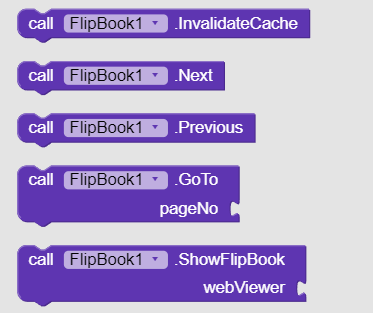
InvalidateCache | Deletes cache files such as downloaded pdfs and extracted images. |
Next | Turns to next page. |
ZoomIn | Turns to next page. |
ZoomOut | Turns to next page. |
Previous | Turns to previous page. |
GoTo | Turns to given page number. |
ShowFlipBook | Shows flip-book in given WebView. Call this method only when pdf has been loaded completely. |
4. Example Blocks
Load pdf from file or url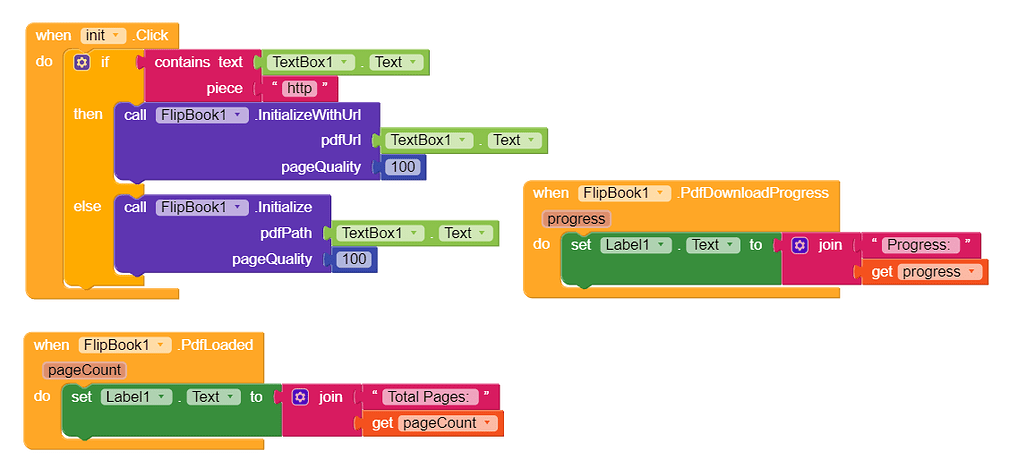
Show flip book in WebViewer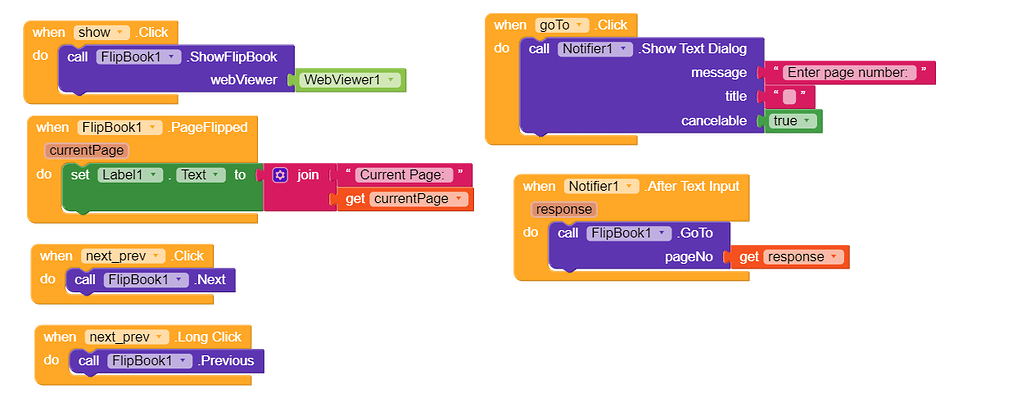
For best experience, show flip book in landscape mode.
5. Purchase Extension
6. Demo Video
Thank you.
Hope it helps!