[PAID] DigitalInk: Handwritten text recognizer and Gesture classifier ($10 or INR 701)
DigitalInk Extension
With DigitalInk recognition extension, you can recognize handwritten text and classify gestures on a digital surface (Canvas) in hundreds of languages, as well as classify sketches. The digital ink recognition uses the same technology that powers handwriting recognition in Gboard, Google Translate, and the Quick, Draw! game.1. Overview
LatestVersion: 2
Released: April 18, 2024
Last Updated: May 18, 2026
Min SDK: 21
Permissions: ACCESS_NETWORK_STATE
Aix Size: 3.2mb
Key Features:
- Converts handwritten text to sequences of unicode characters
- Runs on the device in near real time
- The user's handwriting stays on the device, recognition is performed without any network connection
- Supports 300+ languages and 25+ writing systems, see the complete list of supported languages
- Supports gesture classification for these languages via
-x-gestureextensions
- Supports gesture classification for these languages via
- Recognizes emojis and basic shapes
- Keeps on-device storage low by dynamically downloading language packs as needed
2. Blocks
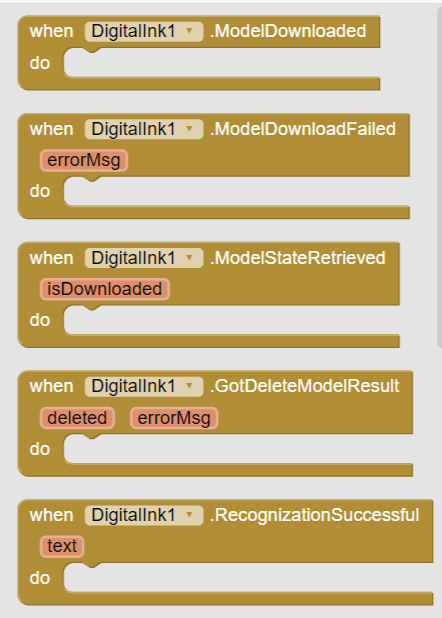
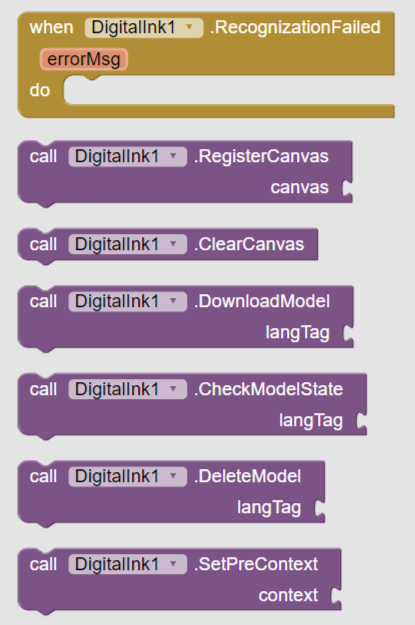
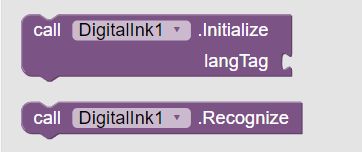
3. Documentation
Events
| ModelDownloaded | Event raised when model is downloaded successfully |
| ModelDownloadFailed | Event raised when model downloading failserrorMsg | text |
| ModelStateRetrieved | Event raised after retrieving model stateisDownloaded | boolean |
| GotDeleteModelResult | Event raised after getting 'DeleteModel' method's result. 'errorMsg' is empty if model was deleted successfully.deleted | booleanerrorMsg | text |
| RecognizationSuccessful | Event raised when recognition was successfultext | text |
| RecognizationFailed | Event raised when recognition failederrorMsg | text |
Methods
| RegisterCanvas | Register Canvas component from which handwritten text will be recognizedcanvas | component |
| ClearCanvas | Clear Canvas drawing. You must use this method instead of Clear method of Canvas component. |
| DownloadModel | Download specified language modellangTag | text |
| CheckModelState | Checks whether model for specified language has been downloaded or notlangTag | text |
| DeleteModel | Remove specified model from device.langTag | text |
| SetPreContext | Recognizer will use this pre-context to identify work breaks and differentiate between ambiguous letter context | text |
| Initialize | Initialize Recognizer for specified languagelangTag | text |
| Recognize | Process Canvas text for recognition |
4. Example Usage
First register canvas component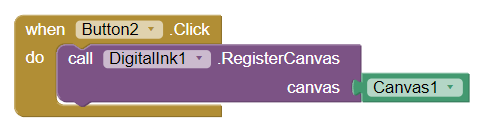
Check language model state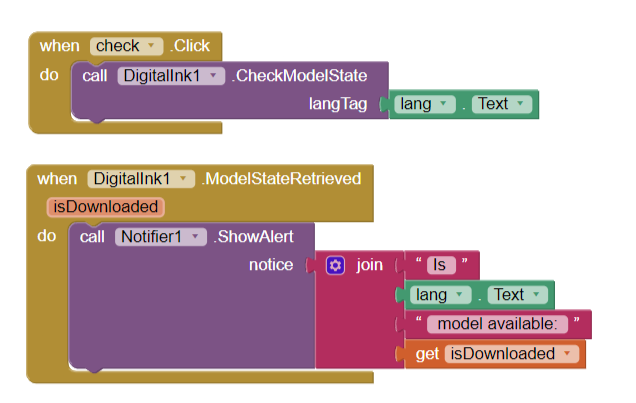
You can list of languages and gestures tag here: https://developers.google.com/ml-kit/vision/digital-ink-recognition/base-models?hl=en
If model doesn't exist then we'll download it otherwise if it exists then we are good to go.
Download Model if not exists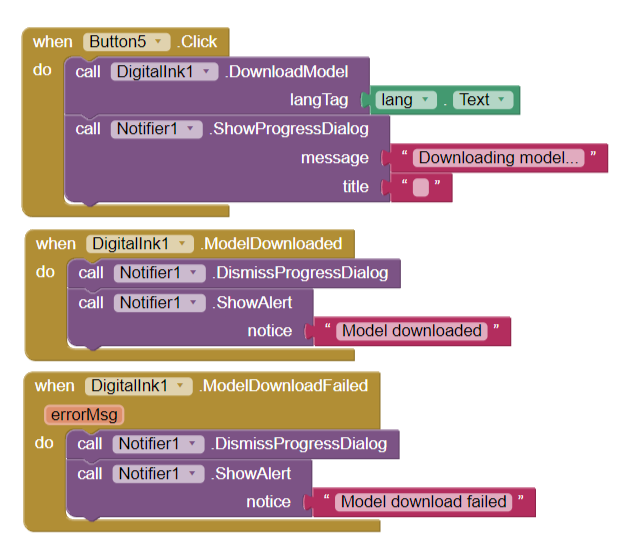
each language model is of ~20mb
If model was downloaded successfully then we can initialize Recognizer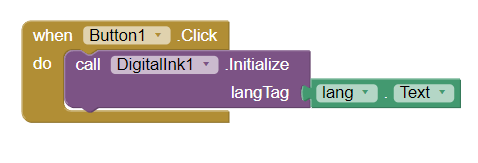
Now we can start recognition process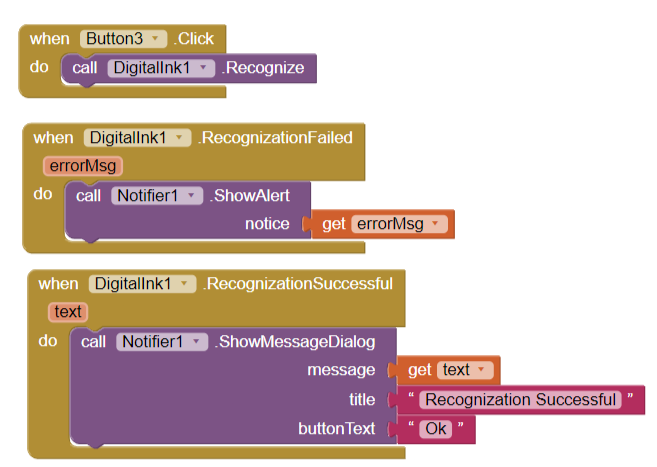
Draw and Clear canvas when needed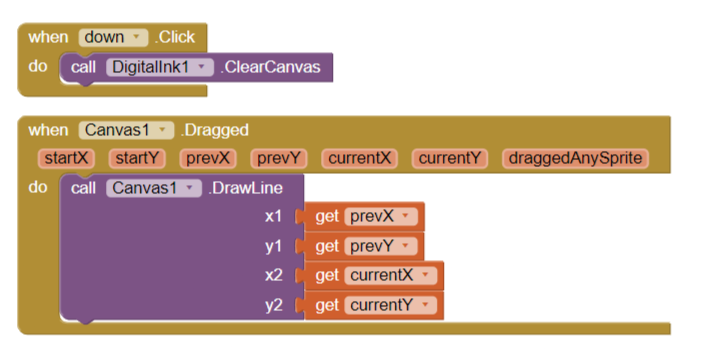
You must use ClearCanvas block of extension
Delete Language Model when not needed further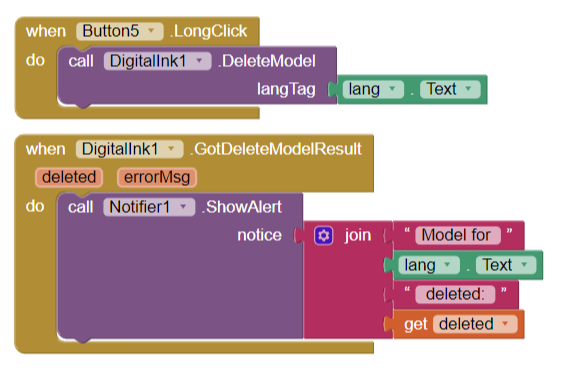
5. Samples and Demos
| Gesture | Example |
|---|---|
arch:abovearch:below |
 |
caret:abovecaret:below |
 |
circle |
 |
| corner:downleft |  |
scribble |
 |
strike |
 |
verticalbar |
 |
writing |
 |
Demo Video
6. Inject Native libs to APK/AAB
You'll get 4 native libs files: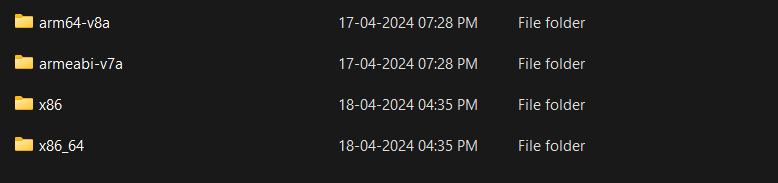
but only arm64-v8a and armeabi-v7a are required to run apk on real devices.
Remaining two are required to run apk on Emulators.
Use NativeUtils extension to load native libs at runtime.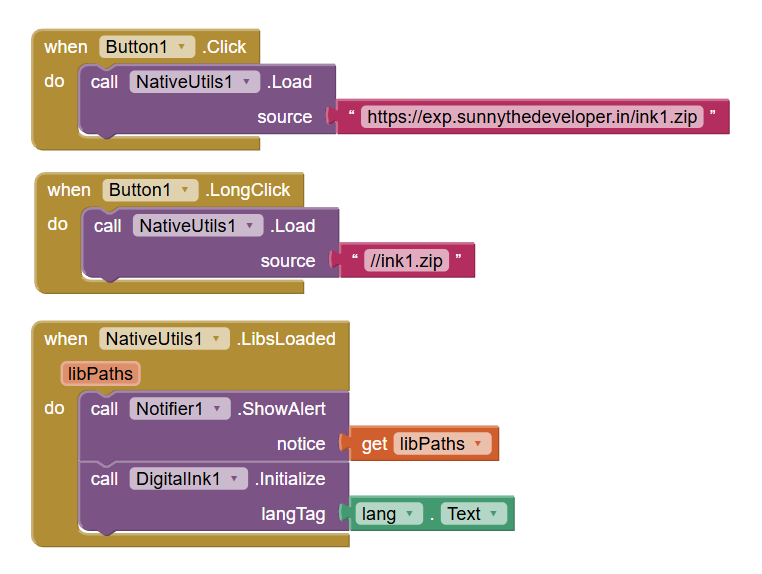
7. Purchase Extension
Thank you.
Hope it helps!