[PAID] MlTBRek: Offline Text and Barcode recognition using ML Kit [$8 or 551]
![[PAID] MlTBRek: Offline Text and Barcode recognition using ML Kit [$8 or 551]](https://community.appinventor.mit.edu/uploads/default/original/3X/a/e/ae8b84a2457af4495a3bdd3f11fc24eae33c0c05.png)
The MlTBRek extension for App Inventor 2 and Kodular enables offline text recognition and barcode scanning using ML Kit. This extension offers modules for barcode and text recognition, including support for various scripts such as Latin, Devanagari, Chinese, Japanese, and Korean. Users can initialize text and barcode recognizers, install and check the availability of necessary modules, and recognize text or barcodes from images, file paths, or content URIs. The extension also provides events for handling module states, recognition results, and errors, making it a powerful tool for integrating advanced recognition features into your apps.
1. Overview
- Offline text and barcode recognition using Google ML Kit.
- Support for multiple language scripts: Latin, Devanagari, Chinese, Japanese, and Korean.
- Initialize text and barcode recognizers separately.
- Install, check availability, and release ML modules as needed.
- Recognize text or barcodes from Image components, file paths, or content URIs.
- Live barcode scanner with camera preview support.
- Detailed events for module states, recognition results (with structured data), and error handling.
- Automatic parsing of QR Codes, Data Matrix, PDF-417, and Aztec values into structured formats (URL, contact, WiFi, geo, email, phone, SMS, calendar, driver license).
Latest Version: 5
Published: 2023-09-02T18:30:00Z
Last Updated: 2026-06-21T18:30:00Z
Aix size: 1.3 mb
Permissions: android.permission.CAMERA android.permission.READ_MEDIA_IMAGES
2. Blocks
MlModules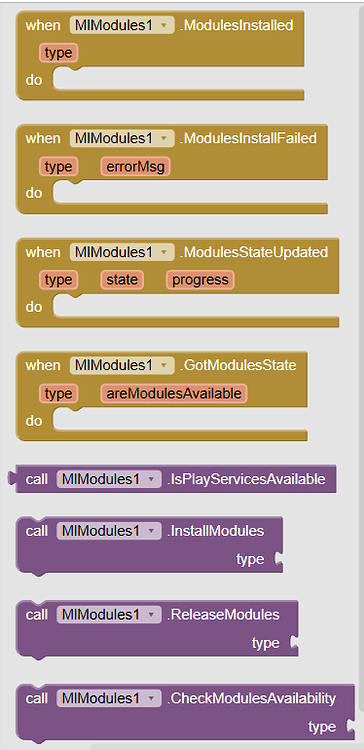
Text Recognizer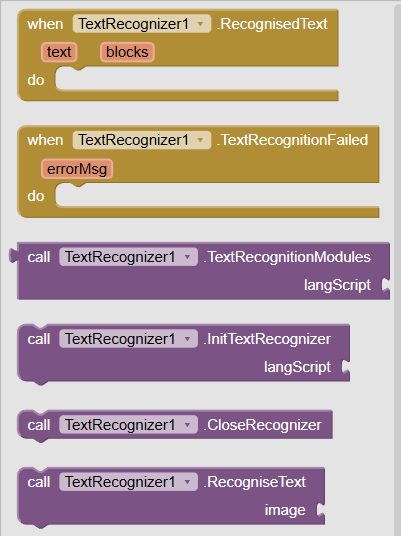
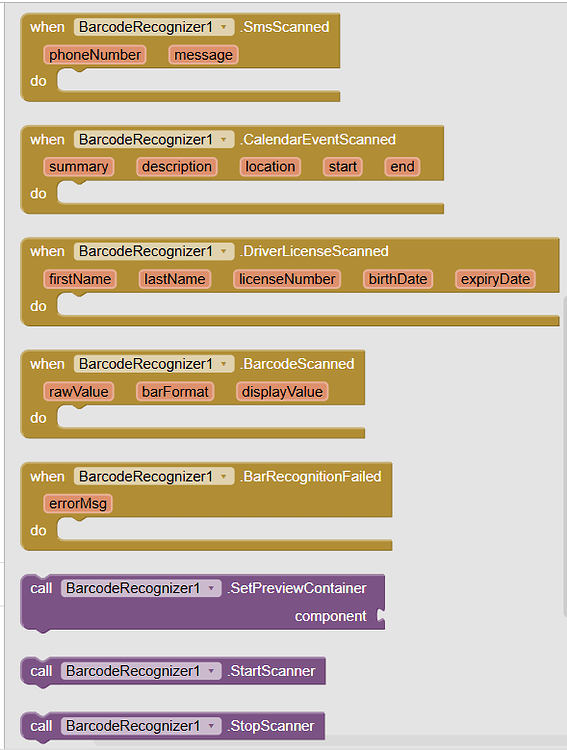
Barcode Recognizer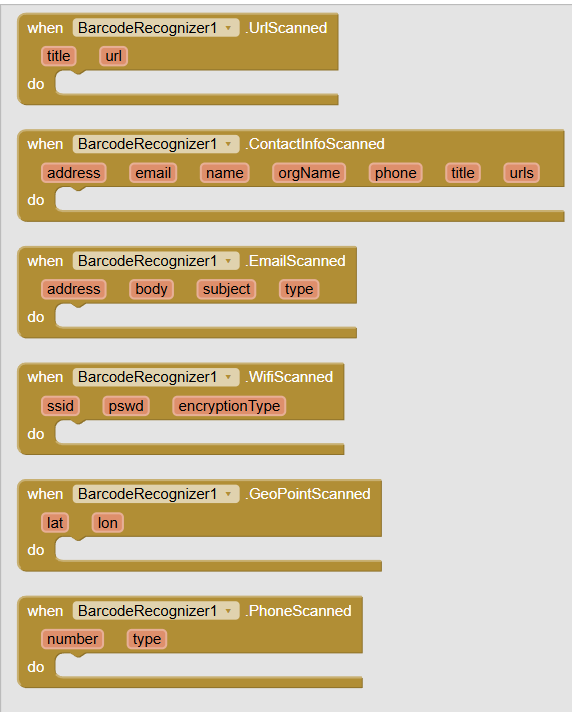
3. Documentation
BarcodeRecognizer
| UrlScanned | Event raised if url was found in barcodetitle : texturl : text | |
| ContactInfoScanned | Event raised if contact info was found in barcodeaddress : textemail : textname : textorgName : textphone : texttitle : texturls : text | |
| EmailScanned | Event raised if email was found in barcodeaddress : textbody : textsubject : texttype : number | |
| WifiScanned | Event raised if wifi info was found in barcodessid : textpswd : textencryptionType : number | |
| GeoPointScanned | Event raised if geo points were found in barcodelat : numberlon : number | |
| PhoneScanned | Event raised if phone was found in barcodenumber : texttype : number | |
| SmsScanned | Event raised if sms was found in barcodephoneNumber : textmessage : text | |
| CalendarEventScanned | Event raised if calendar event was found in barcodesummary : textdescription : textlocation : textstart : textend : text | |
| DriverLicenseScanned | Event raised if driver license was found in barcodefirstName : textlastName : textlicenseNumber : textbirthDate : textexpiryDate : text | |
| BarcodeScanned | Event raised when no specific type of barcode was found and given barcode was decoded in generalrawValue : textbarFormat : numberdisplayValue : text | |
| BarRecognitionFailed | Event raised if barcode scanning failederrorMsg : text | |
| SetPreviewContainer | Sets the view to be used for camera preview.component : component | |
| StartScanner | Starts the live scanner using the view set by SetPreviewContainer. | |
| StopScanner | Stops the live scanner. | |
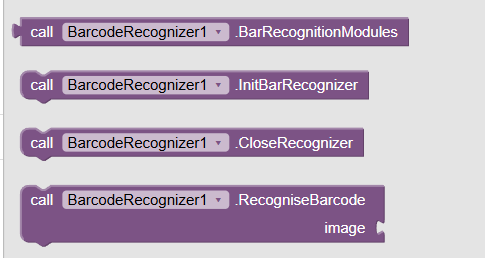
| BarRecognitionModules | Modules for barcode recognition | |
| InitBarRecognizer | Initializes Barcode recognizer/scanner | |
| CloseRecognizer | Method for CloseRecognizer | |
| RecogniseBarcode | Tries to decode barcode from given input which can be an Image component, file path or content uriimage : any |
MlModules
| ModulesInstalled | Event raised when modules have been installedtype : number | |
| ModulesInstallFailed | Event raised when modules installation failedtype : numbererrorMsg : text | |
| ModulesStateUpdated | Event raised when modules state changestype : numberstate : numberprogress : number | |
| GotModulesState | Event raised after checking modules availabilitytype : numberareModulesAvailable : boolean | |
| IsPlayServicesAvailable | Returns whether Google Play Services is available on device or not | |
| InstallModules | Install modules of given typetype : number | |
| ReleaseModules | Initiates a request to release given modules when they are no longer needed.
This method notifies Google Play services that the modules are no longer needed for this app, but it does not guarantee the modules can be removed. Google Play services will try to clean up the modules when they are not used by any apps.type : number | |
| CheckModulesAvailability | Checks given modules availabilitytype : number |
TextRecognizer
| RecognisedText | Event raised after getting text from imagetext : textblocks : list | |
| TextRecognitionFailed | Event raised if text recognition failederrorMsg : text | |
| TextRecognitionModules | Modules for text recognitionlangScript : number | |
| InitTextRecognizer | Initialize Text RecognizerlangScript : number | |
| CloseRecognizer | Closes the Text Recognizer and releases resources. | |
| RecogniseText | Tries to recognize text from given input that can be an Image component, file path or content uriimage : any | |
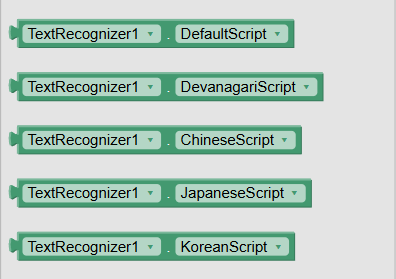
| DefaultScript | Default Latin Script Accepts: number | |
| DevanagariScript | Devanagari Script Accepts: number | |
| ChineseScript | Chinese Script Accepts: number | |
| JapaneseScript | Japanese Script Accepts: number | |
| KoreanScript | Korean Script Accepts: number |
4. Example Usage
Install required modules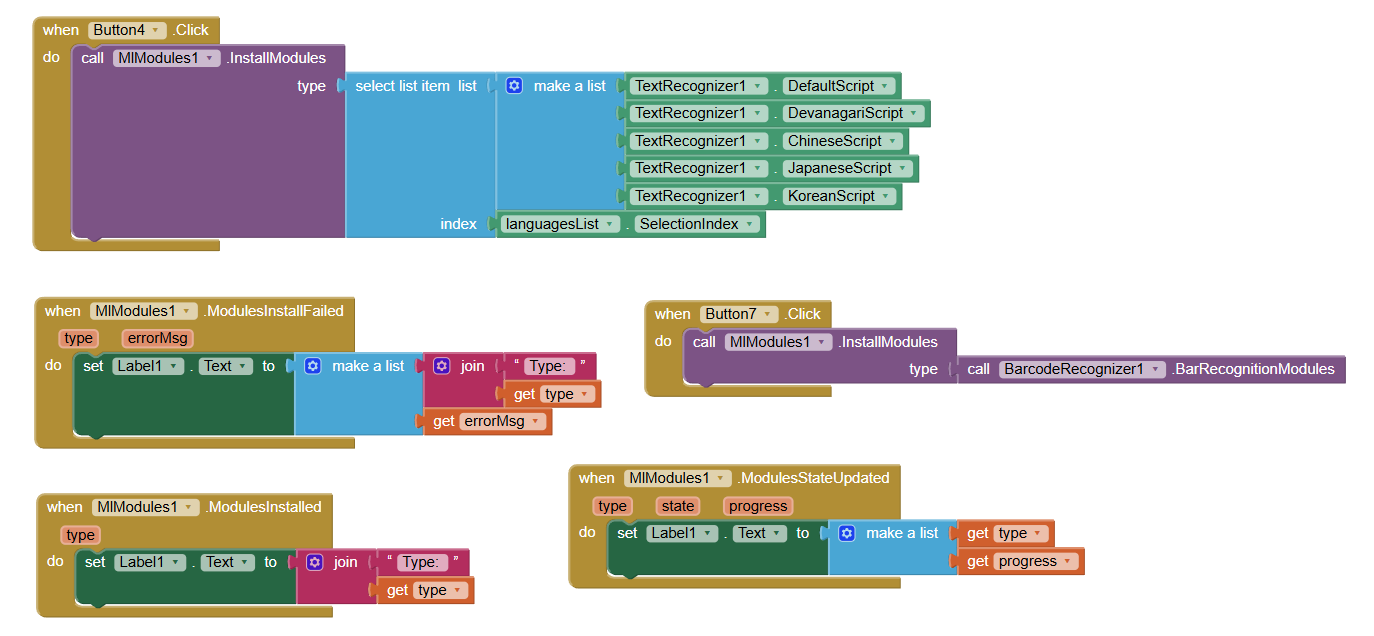
Check modules availability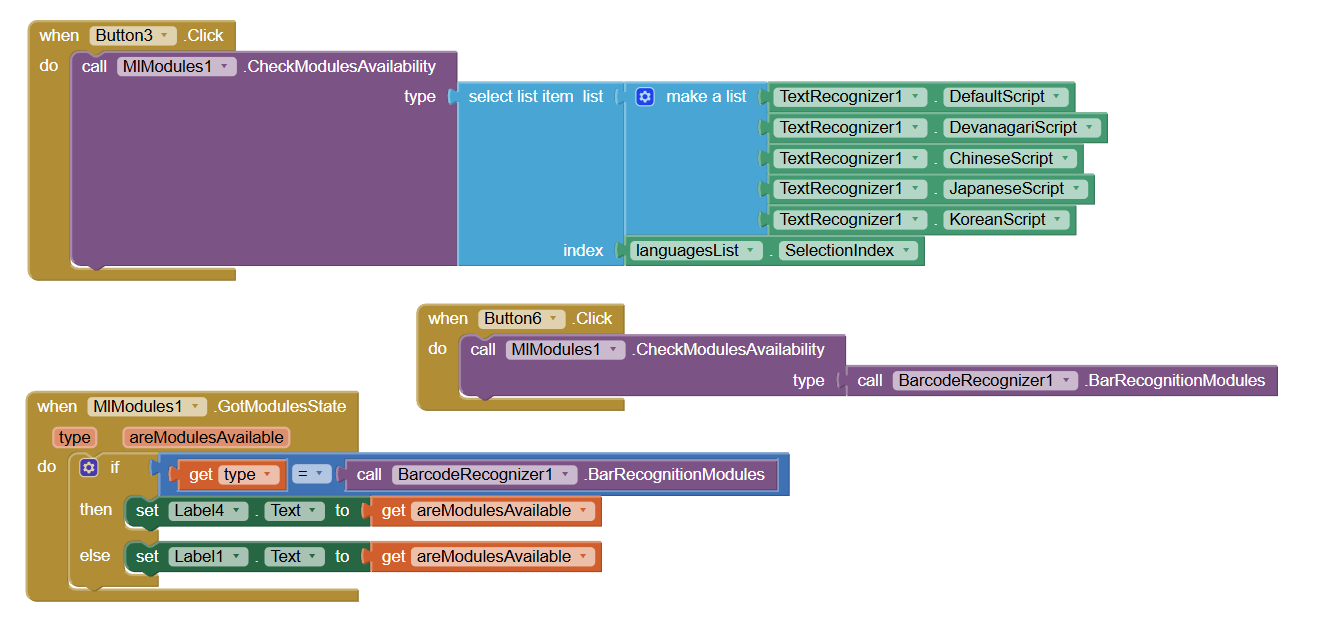
Text Recognisation
First initialize recognizer.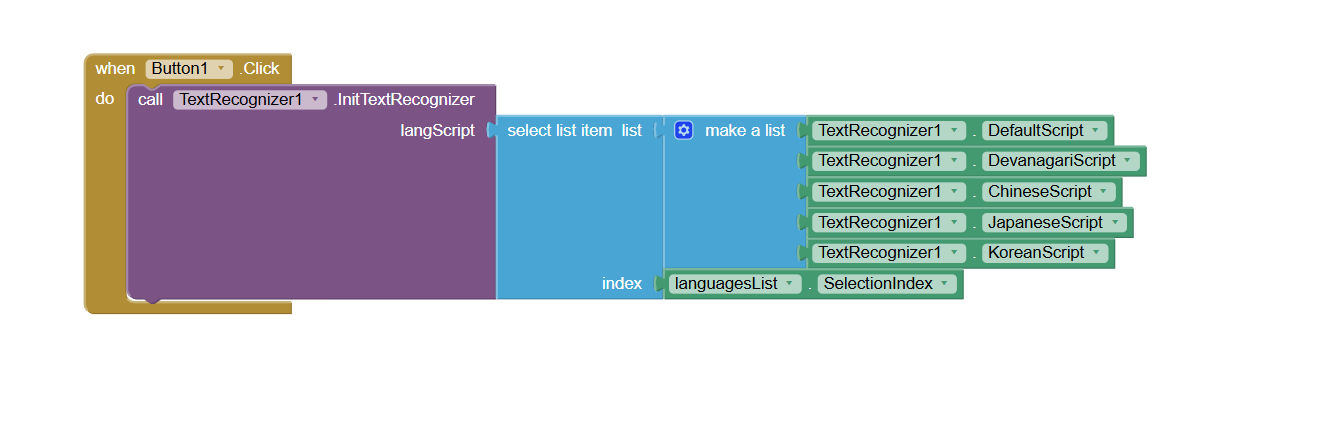
Then provide input image to RecogniseText block.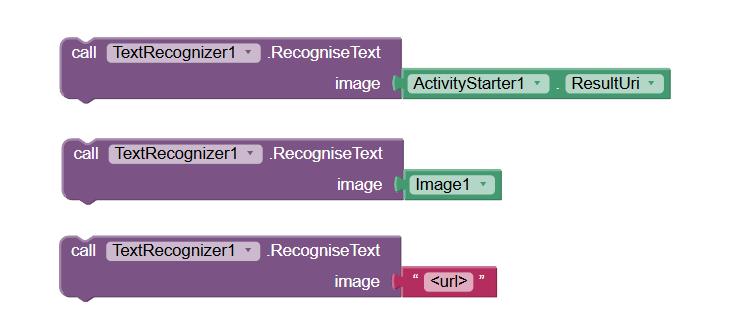
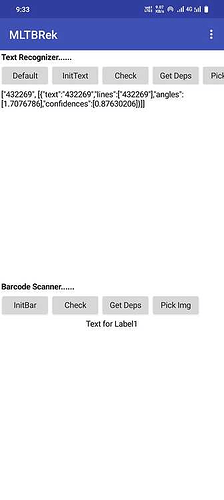
RecognisedText event will be raised with result if recognition was successful otherwise TextRecognitionFailed event will be raised with error message.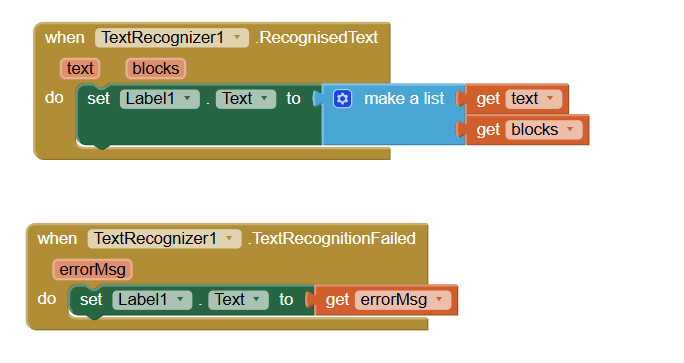
blocksis a list of dictionaries. Each dictionary contains following keys:
- text : complete text
- lines : a list of lines
- angles : a list of angles corresponding to each line
- confidences : a list of confidence values corresponding to each line
All major language scripts are supported.
- Latin
- Devanagari
- Chinese
- Japanese
- Korean
Barcode Recognition
Initialize Barcode recogniser.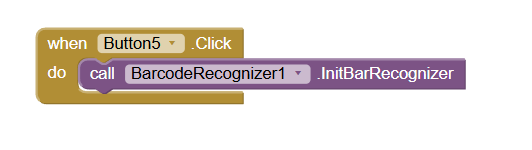
Then provide input image to RecogniseBarcode block.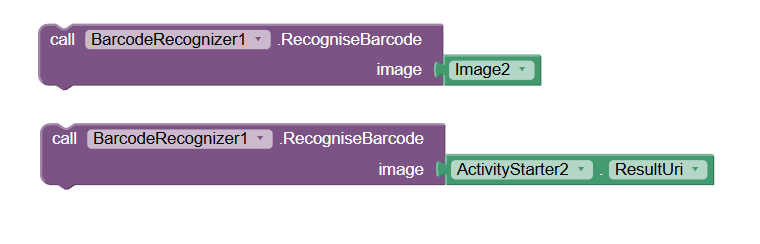
Result will be delivered via different events based upon type of barcode.
It reads the following barcode formats:
- 1D barcodes: EAN-13, EAN-8, UPC-A, UPC-E, Code-39, Code-93, Code-128, ITF, Codabar
- 2D barcodes: QR Code, Data Matrix, PDF-417, AZTEC
It automatically parses QR Codes, Data Matrix, PDF-417, and Aztec values, for the following supported formats:
- URL
- Contact information (VCARD, etc.)
- WiFi
- Geo-location (latitude and longitude)
- Phone number
- SMS
- Calendar Event
- Driver License
Live Scanner
Camera permission is required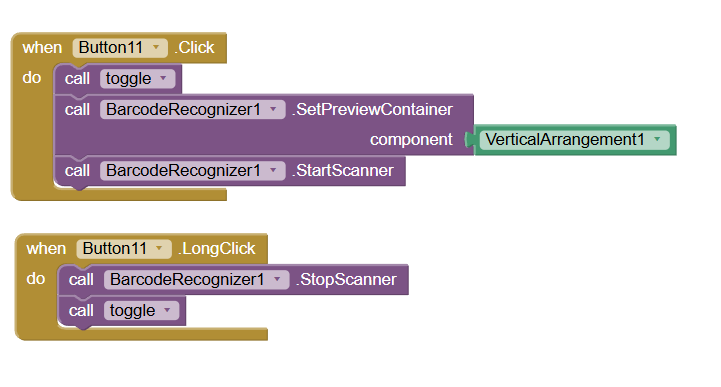
4. Demo Video
5. Changelog
Version 2 — 2023-10-26-
Rename extension to
MlTBRekfromSimpleRecognition -
Some new blocks added and few blocks removed
-
Upgrade to ML Kit
Brings dynamic deps management and thus effectively reducing aix size to just 1.1mb -
Major internal changes wherever there was room for improvement
Like support for Hindi and other Devanagari Script langs -
Recognise blocks can accept
Imagecomponent,File PathorContent Uri -
Completely offline purchase verification
- Aix size reduced to 1.1 mb
- Extension won't crash Companion now
Though none of its blocks will work. - No-conflict version to resolve deps conflict with my other ML Kit extensions like ImageLabelling and ScanKit
-
Extension has been completely re-written so create a backup of imp projects before importing new version
-
Added
Chinese,JapaneseandKoreanlanguage script supported to extension -
Updated Text Recognition (19.0.1) and Bar Recognition (18.3.1) SDKs
-
Added license key property so no need to upload license to assets now
- Online images can also be used now
Simply pass the image url.
Input:

Result:
 Version 5 — 2026-06-22
-
Architectural Modularization Split the monolithic extension into three specialized components (
BarcodeRecognizer,TextRecognizer,MlModules) to keep your projects clean and reduce overhead. -
New Live Camera Scanner Added full support for continuous live barcode scanning through a camera preview (
SetPreviewContainer,StartScanner,StopScannerblocks). -
Added
CloseRecognizermethods to give you explicit control over freeing up ML Kit resources.
Thank you.
Hope it helps!